Theme, plugins and core configuration.
We identify which parts of WordPress control metadata, schema, templates, URLs and crawlable archives instead of allowing several systems to compete for the same output.
WooCommerce gives you far more control than a closed ecommerce platform. Hosting, themes, plugins, taxonomies, URLs, caching and product data can all be changed.
That flexibility is useful, but it also means two WooCommerce stores can behave completely differently underneath. We audit the whole WordPress and WooCommerce stack rather than assuming the ecommerce plugin is responsible for everything.
The ecommerce plugin may be the same, but the server, theme, page builder, SEO plugin, caching layer, product extensions and custom code around it can completely change the final output.
That matters because SEO problems often appear in the browser somewhere different from where they were created. Duplicate schema might come from a theme and an SEO plugin. Slow product pages may be caused by an unrelated extension loading assets everywhere. Thin archives may exist because WordPress created them automatically.
We start by understanding the stack before deciding what should be changed.
We identify which parts of WordPress control metadata, schema, templates, URLs and crawlable archives instead of allowing several systems to compete for the same output.
The catalogue needs clear relationships between commercial categories, individual products, variations and attributes that shoppers use to navigate.
WooCommerce performance can depend heavily on the environment underneath WordPress. Frontend optimisation cannot compensate indefinitely for a poorly performing stack.
Categories, tags, attributes, filters, archives and pagination can produce far more crawlable URLs than the store actually needs in search.
WordPress makes it easy to create more taxonomies, menus, landing pages and content. The challenge is making sure they form a useful hierarchy rather than several overlapping ways to describe the same products.
We review product categories, subcategories, product assignments, navigation, breadcrumbs, related products and contextual links. Important commercial pages should be reachable through ordinary crawlable links rather than depending on internal search.
Product tags and attributes require more judgement. Some may represent meaningful customer demand. Others are internal organisation or filtering tools that do not justify their own search landing pages.
The decision should come from usefulness and search intent, not simply because WordPress generated an archive.
Canonicals, redirects, internal links, XML sitemaps and indexation controls should reinforce the same preferred URLs.
We inspect product and category URLs, taxonomy archives, pagination, filtered states, search pages, attachment behaviour and other crawlable patterns that the WordPress stack exposes.
Changing WooCommerce permalinks deserves particular care. Once an established product or category URL changes, the job is no longer just configuration. It becomes a migration problem: existing URLs need sensible redirects, internal links need updating and the sitemap should reflect the intended destinations.
We also check the rendered source rather than trusting plugin settings. An SEO plugin may say one thing in the admin while a theme or another extension changes the final markup.
WordPress’s modularity is its advantage and its weakness. Several plugins can all believe they are responsible for the same piece of a product page.
Themes, WooCommerce, SEO plugins and specialist schema plugins can all generate Product, Breadcrumb or Organization markup. More markup is not necessarily better if those outputs conflict.
We decide which archive types create useful search destinations and which exist mainly because WordPress automatically exposes them.
Plugins can inject scripts, styles, metadata, filters and new URL patterns across templates where their functionality is not actually needed.
Product and category output depends heavily on the theme. We inspect headings, links, markup and content placement in the rendered page rather than assuming WooCommerce controls it.
WooCommerce can store different prices, stock states, images, attributes and other information for individual variations.
We check what happens when a variation is selected and what information search engines can understand from the main product page.
The parent product is often the sensible primary search destination where size, colour or similar choices share the same underlying intent. That does not mean every catalogue should use the same rule.
If variations genuinely represent distinct products or distinct search demand, the implementation may need more deliberate landing pages.
We also compare visible product information with structured data and feed output where those integrations matter.
WooCommerce gives complete freedom over product and category content. That freedom is useful when the content answers real questions. It becomes noise when every template receives another generic block of text purely for search engines.
Category pages may need introductions, buying guidance, subcategory links or supporting content depending on the search intent. Product pages may need specifications, compatibility information, dimensions, original media, FAQs or other details that reduce uncertainty before somebody buys.
We prioritise the pages with meaningful commercial opportunity first. Template improvements can then support the broader catalogue without pretending every SKU deserves the same amount of manual work.
Optimising images can help, but it will not solve every store that feels slow.
A WooCommerce request can involve PHP execution, database queries, theme logic, plugin hooks, external APIs, caching and frontend assets before the shopper gets a usable page.
We look for repeatable causes rather than treating every Core Web Vitals problem as an image-compression exercise. That can include scripts loading site-wide, heavy product functionality, poor caching, unnecessary database work or a hosting environment that no longer fits the size of the store.
LCP, INP and CLS provide useful signals about loading, interaction and visual stability. We use them as diagnostic evidence rather than treating a perfect laboratory score as the business objective.
Long-running WooCommerce sites tend to accumulate plugins, revisions, transient data, scheduled tasks and configuration from tools that may no longer be active.
We do not automatically blame the database when a site is slow, and we do not recommend deleting data simply because it looks old.
Instead, we use the technical symptoms to decide whether deeper investigation is justified: slow backend responses, excessive queries, repeated scheduled activity, unusually large options or extension behaviour that affects the storefront.
That matters because performance work becomes risky when somebody starts cleaning tables or disabling functionality before proving what is causing the problem.
Where the issue is primarily WordPress rather than SEO, we can separate that work instead of disguising a technical repair as an SEO recommendation.
There is no automatic SEO winner between WooCommerce, Shopify and Magento. They simply move technical responsibility to different places.
Hosting, themes, plugins, URLs and much of the technical implementation are under your control. That can be powerful when the stack is managed carefully.
Shopify manages more of the underlying environment, which reduces technical responsibility but also gives stores less freedom over certain platform conventions.
Magento supports deeper catalogue and operational complexity, which introduces its own decisions around layered navigation, configurable products, indexation and infrastructure.
WooCommerce rewards diagnosis because the same visible problem can originate from WordPress, the theme, a plugin, the server or the catalogue itself.
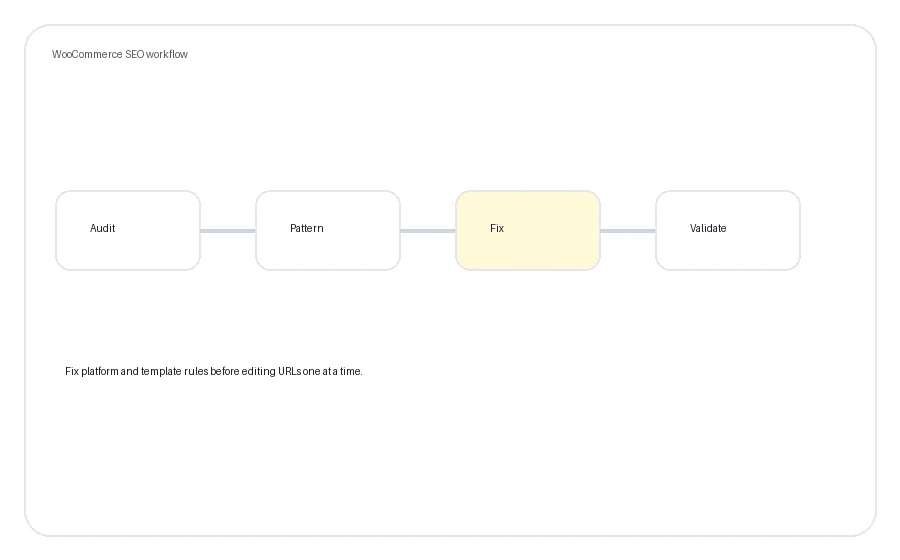
Crawl representative products, categories, taxonomies and parameter patterns and review available search evidence.
Identify whether the issue belongs to WooCommerce, WordPress, the theme, an extension or the hosting stack.
Fix configuration, templates, catalogue structure, content, internal links or technical dependencies in priority order.
Recrawl affected patterns and confirm that the rendered storefront now produces the intended output.
For crawling, indexation and canonical problems, see Ecommerce Technical SEO .
For category structure and commercial search intent, see Category Page SEO .
For individual products, variations and product information, see Product Page SEO .
If the underlying problem sits in WordPress rather than search strategy, see WordPress Fixes .
WooCommerce can provide a strong SEO foundation because WordPress gives site owners extensive control over content, URLs, templates and technical implementation.
That flexibility does not guarantee a good result. The theme, plugins, hosting, catalogue structure and configuration determine what the final store actually produces.
An SEO plugin can make metadata, canonicals and sitemap management much easier.
The problem starts when several plugins or a theme all try to manage the same output. We prefer one clear source of responsibility rather than adding another plugin whenever something looks wrong.
Only when the archive provides a genuinely useful search landing page.
Many stores use tags for internal organisation and end up with thin archives containing very few products. Those pages do not become valuable simply because WordPress makes them available.
It depends on whether the attribute represents useful independent search demand.
A meaningful brand, material or product characteristic may justify a dedicated landing page. Many attribute combinations are better treated as navigation for shoppers rather than standalone search pages.
We look at what each variation represents rather than applying a universal rule.
Size or colour selections often belong within one parent product. Where a variation represents meaningfully different search demand, product information or intent, a different structure may be appropriate.
Yes, particularly when established product or category URLs already receive traffic, links or have been indexed.
URL changes should be handled like a migration: old destinations need appropriate redirects, internal links should point directly to the new URLs and sitemap output should be updated.
They can, but being a plugin is not itself a problem.
We look for conflicting schema or metadata, unnecessary frontend assets, unwanted URLs, slow requests and overlapping functionality. A plugin that provides substantial commercial value may be worth keeping even if it has some technical cost.
We can identify performance problems within the agreed scope and determine whether they originate from themes, plugins, images, caching, database behaviour or hosting.
The objective is to improve the storefront without breaking functionality the business actually needs.
It depends on what needs to change.
Resolving a duplicate indexation problem has a different timeline from reorganising a catalogue or competing for valuable commercial searches.
For ongoing SEO, several months normally provides a more useful evaluation window than a few weeks. That gives changes time to be crawled and provides more meaningful data, but it is not a ranking guarantee.
You don’t need to diagnose it before contacting us. Send us the store, the market you’re targeting and what you want organic search to contribute. We’ll start by working out which part of the stack deserves attention.